


AI Video Maker - Renderforest
3.9480.00 Reviews
App Specs
- Version
- 5.8.4
- Updated On
- License
- Free
- Downloads
- 1,000,000+
- Developer
- Renderforest
- Categories
- Video Players & Editors
- Platform
- Android, iOS
Screenshots
 Analysis by AppCompare
When I want a video that looks put together without turning an evening into an editing session, a template-led mobile editor can be a sensible starting point. AI Video Maker - Renderforest is aimed at that kind of work: quick edits, visual pieces built from prepared designs, and short clips where a clear style matters more than frame-by-frame control. I find it most appealing when I already know the message I want to share but would rather not assemble every graphic and transition from scratch.
Where the app fits today
Renderforest makes a video editing app in the Video Players & Editors category, and the balance here leans toward accessible creation rather than a full desktop-style editing workflow. Its tools cover practical jobs such as cutting media and adding music, while templates and AI-assisted video creation help users get from an idea to a finished-looking piece. The app is free to install, with optional in-app purchases ranging from $5.99 to $179.99 per item, so I would treat the free experience as a way to explore the workflow before deciding whether a paid option suits regular use.
Its current version is 5.7.0, and the app first appeared on July 28, 2021. Those facts tell me this is an established product with a continuing version history, not a brand-new experiment. They do not, by themselves, show exactly what changed between releases, so I would not assume that a particular tool or template arrived in a specific update. What matters to a new user is that the present version is the one to judge: check how its available designs fit your project and whether the editing controls give you enough say over the result.
The app has a 4.0 average from around 22,000 ratings, alongside about 473 written reviews, and has passed one million installs. I see that as a sign that it has found a broad audience, not proof that every workflow will feel effortless. Video editing is personal: someone making a quick greeting has very different needs from someone producing a carefully paced product demo. The age guidance is Everyone 10+, and the minimum operating system is Android 8.0, which is worth checking before you plan a project around it.
Getting Started with Renderforest
First off, installation was a breeze. A few taps on my screen, and I was ready to roll. The interface is super friendly, which was a relief because I wasn’t in the mood to wrestle with complicated menus and hidden features.
As soon as you fire up AI Video Maker - Renderforest, you’re greeted with a dashboard that’s clean and well-organized. Everything you need is right there, making it perfect for someone who might be a bit intimidated by more complex software. I felt like I was being gently guided by a knowledgeable friend, which was a nice touch.
The Magic of Template Selection
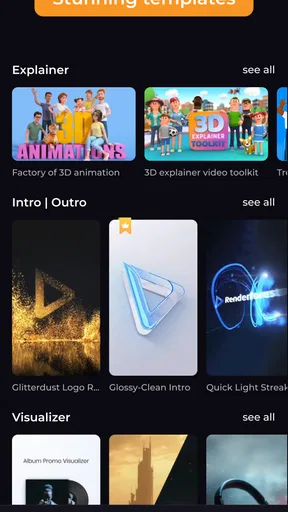
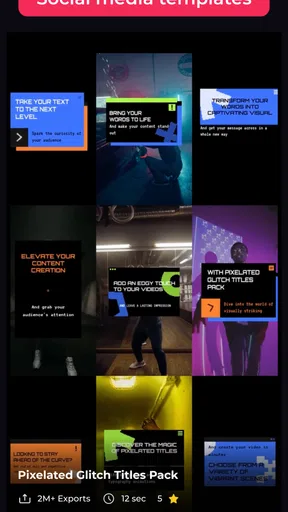
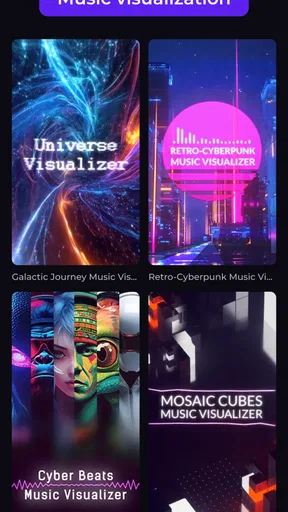
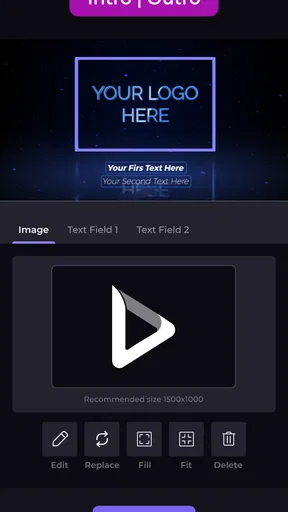
One of the standout features for me was the wide range of templates available. Whether you’re creating a snazzy promo for your business or just a fun birthday video for a friend, there’s something for everyone. I was particularly impressed by the quality of the templates. They’re modern, fresh, and don’t have that cheesy stock footage vibe that you sometimes get with other apps.
Worth Reading Before You Choose

EA SPORTS FC Mobile 26 Is a Bigger Football Game, but It Takes Time

Flipboard Shows What News Apps Must Do Beyond the Feed

Switching to Android Auto Means Rethinking Your Driving Routine

Google Calendar Makes a Crowded Week Easier to Manage

Ludo King Makes the Most of the Minutes Between Plans

Baby Panda World Brings Quick Play to Modern Phones, but Its Game Library Feels Busy
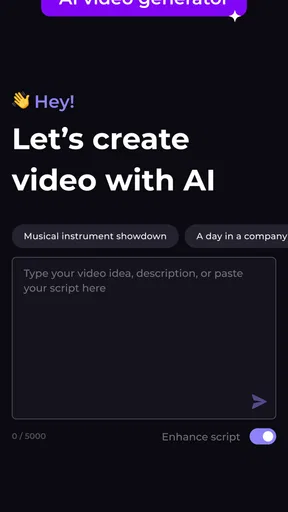
Browsing through the templates, I felt like a kid in a candy store. I ended up picking one for a short travel video. The AI suggestions were spot on, helping me choose visuals and effects that matched the mood I was going for. It’s like the app was reading my mind!
Editing: Easy and Fun
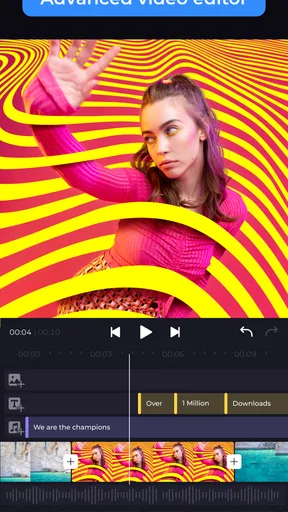
Now, let’s talk about the editing part. This is where AI Video Maker - Renderforest really shines. The editing tools are intuitive and straightforward, yet surprisingly powerful. I could cut, trim, add text, and even throw in some cool transitions without breaking a sweat.
One feature I found particularly awesome was the AI-driven music selection. You just tell the app the vibe you’re going for, and it suggests tracks that fit perfectly. I ended up with a tune that matched my travel video seamlessly, giving it that extra oomph. Plus, the audio syncing was spot on—no awkward mismatches here!
Making a small project feel intentional
A useful way to approach a template editor is to choose the story before choosing the decoration. For a weekend trip, I would first pick a handful of clips that show a beginning, a highlight, and a closing moment, then fit them to a design. That simple order helps avoid a common trap: selecting a flashy template and then forcing unrelated footage into it. If the clips do not support the template’s rhythm, the result can feel busy even when each individual shot looks good.
I would also keep on-screen text short. A location, a date, or a few words of context can make a personal montage easier to follow, but long captions compete with the images and may be hard to read on a phone. Before exporting, I’d watch the whole piece once with the sound on and once with it muted. The first pass checks whether music and cuts feel coherent; the second shows whether the story still makes sense to someone scrolling with audio off.
Everyday jobs it handles well
For a small shop, this kind of workflow can help turn a few product photos and short clips into a simple announcement without asking the owner to learn a complicated timeline editor. A community group could use it for an event recap, while a family member might assemble a birthday greeting from phone footage. These are jobs where a consistent visual frame and a quick finish can matter more than granular control over every edit.
My realistic use case would be sharing a short travel recap after getting home: pick a template that suits the mood, choose only the strongest clips, trim out shaky starts, add a restrained title, and then check that the music does not overpower voices or important ambient sound. The app can make the assembly feel less daunting, but the selection still depends on me. A template cannot rescue footage that is too dark, repetitive, or unrelated, so choosing fewer, better moments is often the most effective editing decision.
How it compares with other mobile editors
Compared with a conventional timeline editor, Renderforest’s template-first approach trades detailed control for speed and a more guided path. That is a fair exchange when I need a polished intro, outro, or compact social clip and do not want to build the visual structure manually. In a timeline-based app, I would expect more freedom to place and adjust each element precisely; that flexibility is better for layered edits, tightly timed dialogue, or a project that must follow an exact brief.
It also serves a different purpose from a basic trimming tool. A simple cutter is usually the quicker choice when all I need is to remove the beginning and end of a clip, with no extra presentation. Renderforest makes more sense when I want the result to look designed, but the template approach can introduce a house style that does not suit every brand or personal taste. I would preview several options before settling on one rather than assuming the first attractive design will fit the footage.
Keeping control of the edit
AI suggestions are useful as starting points, not decisions I would accept automatically. If the recommended visuals or effects do not match the subject, I would swap them out instead of letting a convenient suggestion steer the story. The same goes for music: a track can create energy, but it may also mask spoken audio or make a quiet memory feel overproduced. Lowering the emphasis on decoration can make a project feel more personal and less like a template demonstration.
For repeat work, I would save a small set of reliable choices in my own notes: which visual style suits the business, what wording belongs in an opening, and what kind of music fits the intended mood. That is a practical way to make successive clips feel related without relying on an assumed brand-kit feature. It also makes it easier to notice when a design is becoming repetitive and needs a different treatment.
Who should choose it—and who may not
I would recommend trying it if you are new to video editing, want guided creative choices, or regularly make short promotional and personal videos. It can also suit an experienced editor who needs a quick starting point for a simple piece, as long as the template does not restrict the final look. The strongest fit is someone who values convenience and visual polish but is still willing to review the result carefully.
I would skip it for projects that depend on precise audio mixing, elaborate layered compositing, detailed color work, or exact control over every cut. A dedicated timeline editor is likely the better tool in those situations. I would also choose a straightforward crop-and-trim app for a one-off clip that needs no titles or design. The paid purchase range is broad, so before spending, I would check which option unlocks the specific workflow I need and whether I expect to use it often enough to justify the cost.
Questions worth settling before a project
Can I use it for a quick social video? That is a natural fit for a template-led editor, provided I keep the message focused and check that the framing and text remain readable on a small screen. Can it replace a professional editing setup? I would not count on that for demanding work; its appeal is reducing the effort involved in assembling simpler videos, not removing the need for specialist control when a project calls for it.
Is the free app enough to get started? Since installation is free and purchases are optional, I would explore the available workflow first, then decide whether a paid item is relevant to the project rather than buying on impulse. Will AI make all the creative choices for me? I would treat it as assistance, not authorship: I still need to select suitable footage, reject mismatched suggestions, and watch the finished piece. Those checks are what turn a quick draft into something I am comfortable sharing.
Rendering and Sharing
Once I was happy with my masterpiece, it was time to render and share. I was expecting a long wait, but to my surprise, the video was rendered in no time. The quality was top-notch, and there were no annoying watermarks either, which is a huge win in my book.
Sharing the video was a piece of cake. The app offers direct sharing to all major platforms, so whether you’re posting on Instagram, Facebook, or YouTube, you’re covered. I shared mine with a few friends, and they were seriously impressed. One of them even asked if I’d gone pro!
What I would watch for as it develops
With version 5.7.0 as the current release, I would judge Renderforest on the tools and behavior I can use now, rather than treating possible future additions as promises. For people who already rely on it, the practical test of any new version is whether their familiar editing path still works smoothly and whether changes make routine tasks clearer, not merely whether more options appear. I would keep an eye on how templates, AI suggestions, and basic editing fit together, since that combination is the reason to choose this app over a plain cutter.
My main remaining caution is the mismatch that can happen between a quick template workflow and a project with specific creative requirements. If the app gives me a good-looking draft but not the timing or control I need, I would finish the idea in a more precise editor instead of forcing the template to do everything. That is not a flaw for every user; it is simply the boundary I would keep in mind when choosing a tool for work I need to deliver.
Final Thoughts
In conclusion, AI Video Maker - Renderforest is a fantastic tool for anyone looking to create stunning videos without the hassle. It’s perfect for beginners, yet robust enough for more experienced users. The blend of simplicity and functionality is what makes it stand out. Whether you’re making a quick personal project or something more professional, this app has got your back.
Would I recommend it? Absolutely! Give it a try, and you might just find yourself hooked. Happy video making!
Pros
- User-friendly interface for quick edits.
- Wide range of templates available.
- Supports high-quality video output.
- Cloud-based
- no installation needed.
- Regular updates with new features.
Cons
- Requires internet for full functionality.
- Limited free version capabilities.
- Occasional lag in rendering large files.
- Subscription model can be costly.
- Customization options can be limited.
FAQs for AI Video Maker - Renderforest
What features does AI Video Maker - Renderforest offer?
AI Video Maker - Renderforest provides a range of features including customizable video templates, an intuitive drag-and-drop editor, and AI-driven tools to automatically enhance video quality. The app also offers a library of stock footage, music, and images, making it easier to create professional videos without extensive editing skills.
Is AI Video Maker - Renderforest suitable for beginners?
Yes, AI Video Maker - Renderforest is designed to be user-friendly, catering to both beginners and experienced users. The intuitive interface and guided tutorials ensure that even those with no prior video editing experience can create stunning videos. The AI tools simplify the process by automating complex edits.
Can I use AI Video Maker - Renderforest for free?
AI Video Maker - Renderforest offers a free version with limited features and access to basic templates. However, to unlock premium templates, remove watermarks, and access high-resolution downloads, a subscription is required. There are various pricing plans available to suit different needs and budgets.
What types of videos can I create with AI Video Maker - Renderforest?
With AI Video Maker - Renderforest, you can create a variety of videos including corporate presentations, promotional videos, educational content, and social media clips. The app's versatile templates cater to different styles and purposes, allowing users to tailor their projects to specific audiences and goals.
Is Renderforest compatible with both Android and iOS devices?
Yes, Renderforest is available on both Android and iOS platforms, ensuring compatibility across a wide range of devices. Users can easily download the app from the Google Play Store or Apple App Store, and the app is optimized for mobile use, providing a seamless editing experience on the go.


